
Google AdWords, now called Google Ads, offers tools to discover keywords, estimate search demand, and plan paid search campaigns. Its built-in Google Keyword Planner helps advertisers find relevant search terms, compare estimated advertising costs, and organize keywords before launching a campaign.
However, finding keywords is only the first step. You also need to understand what the numbers mean, identify terms that match your business, and organize them around your advertising goals.
This guide explains how to use Google AdWords for keyword research, evaluate keyword ideas, and turn your research into a practical Google Ads keyword plan.
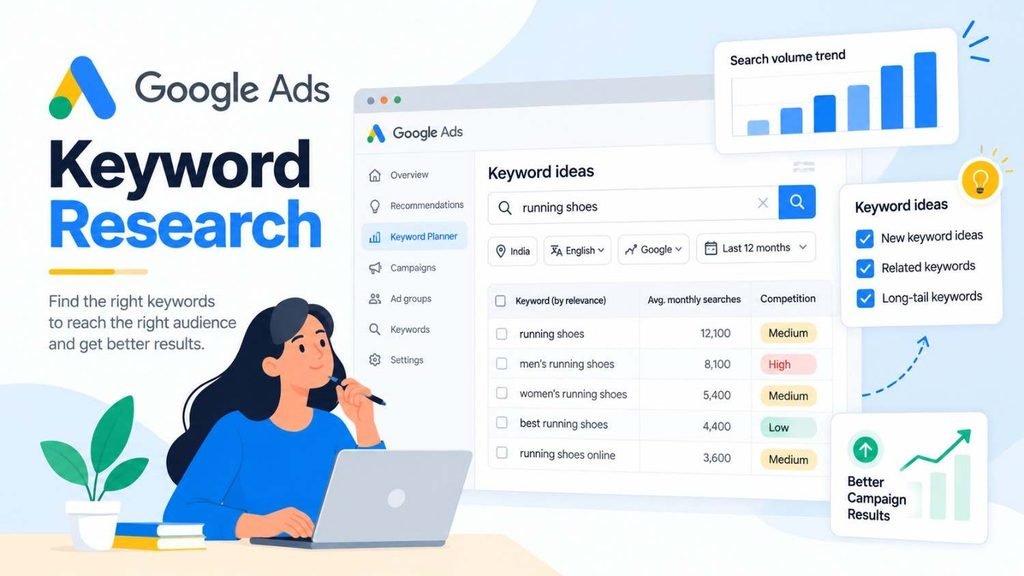
What Is Google Keyword Planner?
Google Keyword Planner is a keyword research tool within Google Ads. It helps advertisers discover keyword ideas related to their products, services, or websites and review estimates of search demand and advertising costs.
You can use it to:
- Discover new keyword ideas from search terms or website URLs.
- Review average monthly search estimates.
- Compare advertiser competition and estimated top-of-page bids.
- Organize related keywords into groups.
- Forecast potential campaign clicks, impressions, and conversions.
Keyword Planner is primarily designed for paid search campaigns. Although its data can inform broader keyword research, its advertiser competition and bid estimates are not the same as organic SEO difficulty.
For more background on how search marketing fits into digital marketing, read What Is Digital Marketing? 10 Types, How It Works, and Key Features.
Official resource: Use Keyword Planner – Google Ads Help.
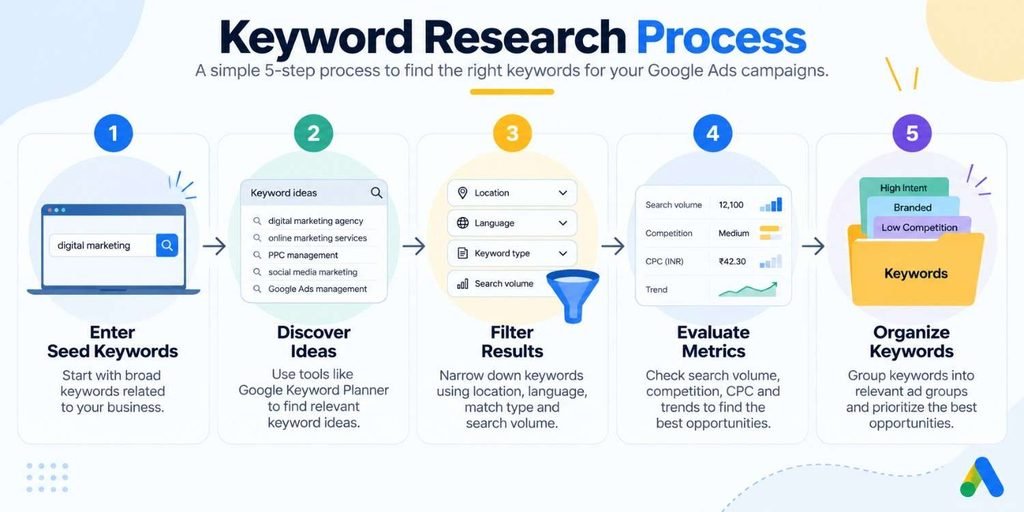
How to Use Google Keyword Planner for Keyword Research
1. Access Google Keyword Planner
Sign in to your Google Ads account and open the Tools menu. Under the Planning section, select Keyword Planner.
Google requires you to complete account setup, including billing information, to access basic keyword discovery features. The available interface can vary according to your account setup and mode.
You do not need to launch a full advertising campaign just to understand the research process, but you should check Google’s current account requirements before getting started.
2. Choose a Keyword Research Method
Keyword Planner provides two main options:
- Discover new keywords: Find keyword ideas based on words, phrases, or a website.
- Get search volume and forecasts: Review estimates and potential performance for an existing keyword list.
If you are starting from scratch, choose Discover new keywords. If you already have a list from your research, use the forecasting option to evaluate it.
3. Enter Seed Keywords or a Website
Seed keywords are the initial terms you enter to generate related suggestions. They should describe your business, products, services, or the problems your customers want to solve.
For example, an online shoe store could start with:
- Running shoes
- Sports shoes
- Trail running shoes
- Buy running shoes online
You can also enter a relevant website URL. Google will use the site’s content to generate keyword ideas. Combining a few relevant phrases with a suitable website can produce a broader set of suggestions than relying on a URL alone.
Avoid entering unrelated terms simply to increase the number of results. The purpose is to discover searches that could realistically connect a potential customer with your offer.
4. Set Your Location and Language
Your settings should reflect the audience you intend to reach.
For example, a business targeting customers in India should select the relevant Indian locations and language settings rather than relying on worldwide estimates. A local service provider may need to narrow the location further to the cities or regions it serves.
These settings affect the usefulness of your results because keyword demand and advertising costs can vary across markets.
5. Review and Filter Keyword Ideas
After selecting Get results, review the suggestions and narrow them down using the available filters and keyword categories.
Look for terms that are relevant to your offering, reflect a clear customer need, and fit your campaign objectives. Remove irrelevant suggestions before adding keywords to your plan.
For instance, a store selling new running shoes may exclude searches focused on shoe repair if it does not provide repair services.
6. Save Your Keywords and Review Forecasts
Select suitable keywords and add them to a keyword plan or relevant ad groups. Keyword Planner can then provide forecasts based on the keywords and campaign settings you supply.
Forecasts may include estimated clicks, impressions, and other performance measures, depending on your account setup and selected metrics. Treat these figures as planning estimates, not promises of actual campaign performance.
Keyword research is one part of a broader digital marketing strategy. Once you understand what your audience is searching for, you can use those insights to plan relevant campaigns across different channels. Learn more in Strategies for Social Media Marketing: How to Build a Strategy That Gets Results.
How to Understand Google Ads Keyword Metrics
Keyword Planner provides several metrics to help you compare potential keywords. Understanding their differences prevents you from choosing terms based on misleading assumptions.
Average monthly searches
This metric estimates how often a keyword is searched on average each month, based on the selected settings and available historical data.
A high number suggests greater search demand, but it does not automatically mean the keyword will produce more customers. The searches may be informational, unrelated to your offer, or too broad to be commercially useful.
Competition
The competition metric indicates how many advertisers are competing for a keyword in Google Ads. It is not an organic ranking difficulty score.
A keyword with high advertiser competition may attract substantial commercial interest, but it can also be expensive or unsuitable for a limited budget. Always consider the relevance of the keyword and the value of a potential customer.
Top-of-page bid estimates
Keyword Planner may show low- and high-range estimates for top-of-page bids. These provide an indication of the bids historically associated with ads appearing near the top of search results.
They are not guaranteed click prices. Actual costs depend on factors such as the auction, competing advertisers, ad quality, targeting, and other campaign settings.
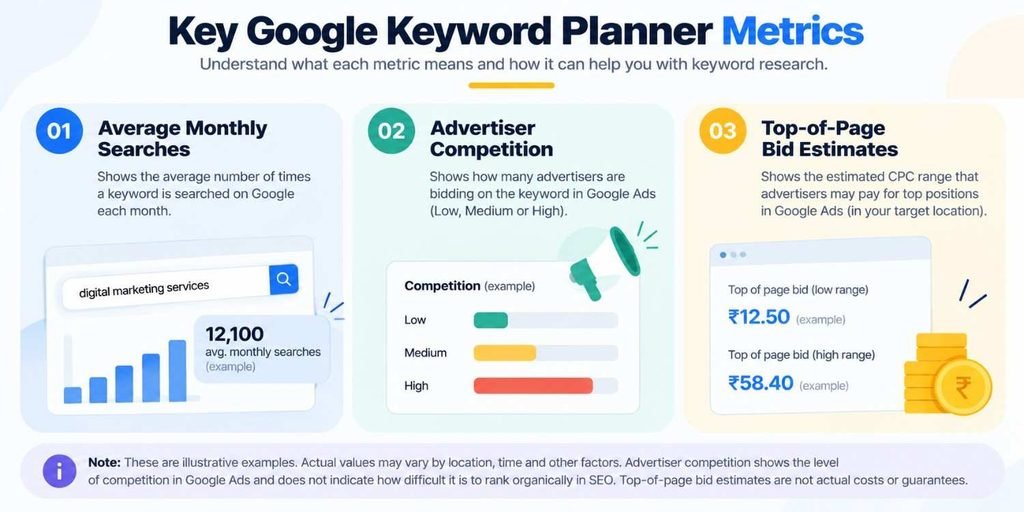
Google explains these metrics and their limitations in its official Keyword Planner documentation.
How to Choose the Right Keywords for Google Ads
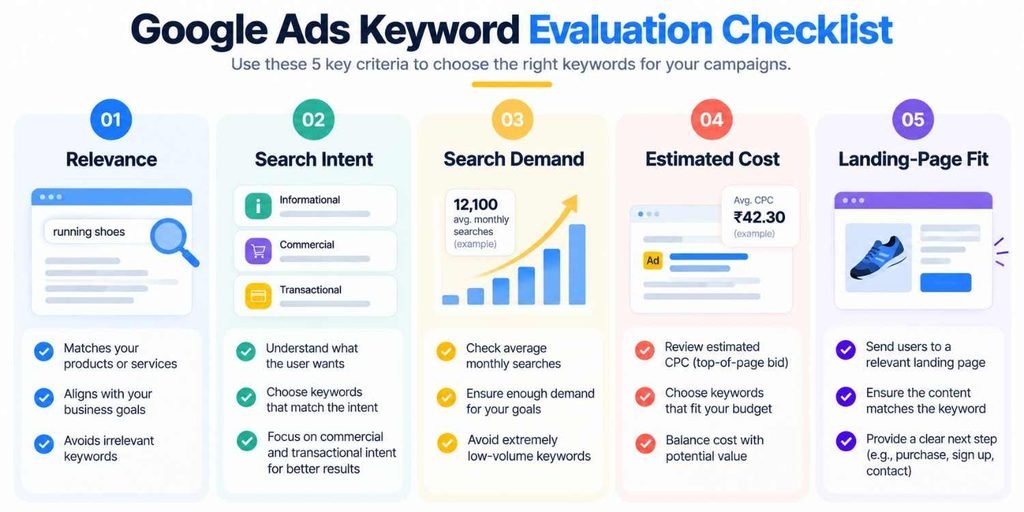
Once you have a list of ideas, evaluate each keyword against your campaign objectives.
Relevance: Does the term describe your actual product or service?
Search intent: Is the searcher researching a topic, comparing solutions, or looking to purchase? For example, “what are trail running shoes” suggests a different need from “buy trail running shoes online.”
Search demand: Is there enough potential demand to justify testing the keyword? Do not automatically reject a specific, lower-volume term if it closely matches what you sell.
Estimated cost: Consider the bid estimates alongside your budget and the likely value of a conversion.
Landing-page fit: Can the page you plan to send visitors to directly answer the searcher’s need? A keyword about a specific product should generally lead to a relevant product or category page rather than an unrelated homepage.
These checks help you build a focused list instead of selecting every keyword with a promising search estimate.
If you are also researching organic visibility, see What Is SEO and Why Is It Important? A Beginner’s Guide. SEO and paid keyword research can inform each other, but their metrics and objectives should not be confused.
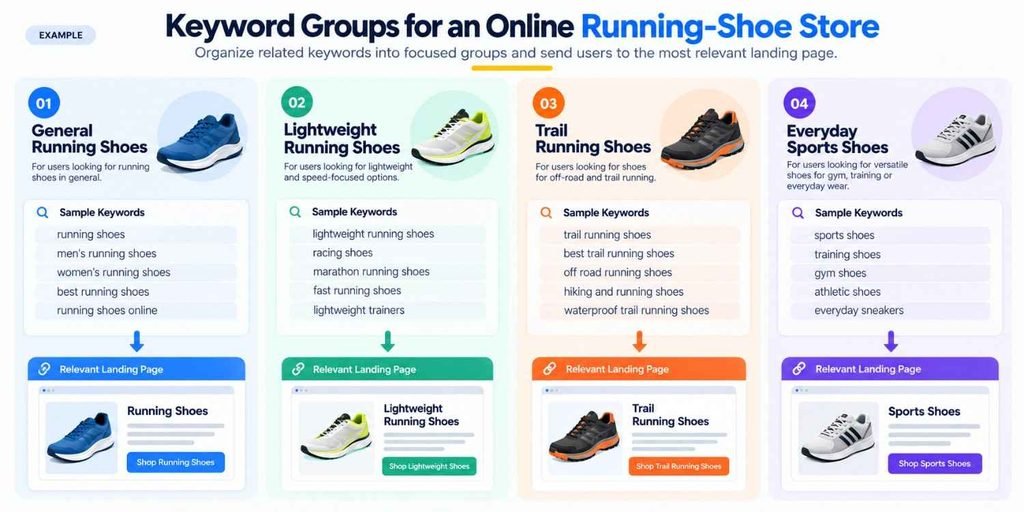
A Practical Example: Grouping Keywords for a Google Ads Campaign
Imagine an online store selling running shoes. After using Keyword Planner, the store discovers these potential terms:
- Buy running shoes online
- Lightweight running shoes
- Trail running shoes
- Trail running shoes for beginners
- Sports shoes for everyday use
Rather than placing every term into one loosely related group, the advertiser can organize them by product and intent.
| Keyword theme | Example keywords | Possible landing page |
|---|---|---|
| General running shoes | Buy running shoes online | Running shoes category |
| Lightweight shoes | Lightweight running shoes | Lightweight shoe collection |
| Trail shoes | Trail running shoes; trail running shoes for beginners | Trail running collection |
| Everyday sports shoes | Sports shoes for everyday use | Relevant sports shoe category |
This is an illustrative structure, not a recommendation to use every listed keyword. The advertiser should confirm relevance, review actual search demand, and decide whether the budget supports each group.
Each ad group should have a clear theme. This makes it easier to write relevant ads and send visitors to pages that match their searches.
How Keyword Match Types Affect Your Research
Selecting a keyword does not mean your ad will appear only when someone types that exact phrase. Google Ads uses keyword match types to determine which searches may trigger an ad.
- Broad match can reach a wider range of searches related to the keyword’s meaning.
- Phrase match can reach searches that include the meaning of the keyword.
- Exact match focuses more closely on searches with the same meaning or intent.
For example, a keyword related to trail running shoes may match relevant variations rather than only one identical wording. The reach and matching behavior depend on the selected match type and Google’s matching systems.
Match types affect how your researched keywords may be used in a campaign, so choose them according to your targeting strategy and ability to monitor results. You can also use negative keywords to exclude searches that are irrelevant to your offer.
Read Google’s guide to keyword matching options before finalizing your campaign.
Is Google Keyword Planner Free to Use?
Google Keyword Planner is available through Google Ads without a separate subscription fee. However, Google requires account setup, including billing information, to access basic keyword discovery features.
Using the tool for research is different from running ads. Advertising can incur costs when your campaigns generate billable interactions.
The amount and detail of historical search data available may vary, and forecasts remain estimates. Use the information to compare opportunities and plan your campaign, then validate your decisions against real performance data.
Common Google Ads Keyword Research Mistakes
Avoid these common mistakes when researching keywords:
- Choosing keywords only by search volume: High demand does not guarantee relevance or conversions.
- Confusing advertiser competition with SEO difficulty: These metrics measure different things.
- Ignoring location and language: Incorrect settings can make your estimates less useful.
- Grouping unrelated keywords together: Poorly structured groups can weaken the connection between searches, ads, and landing pages.
- Treating forecasts as guarantees: Actual results depend on bids, budget, competition, ad quality, targeting, and user behavior.
- Ignoring search terms after launch: Review campaign search-term data and exclude irrelevant traffic where appropriate.
Keyword research should not end when a campaign goes live. Use the results to refine your targeting, improve ad relevance, and identify opportunities worth testing.
For related content planning guidance, explore What Is Content Marketing? Simple Explanation With Real Examples and Features of Social Media Marketing: Key Features, 5 Pillars & Beginner Steps. The principles of understanding audience needs and matching content to intent also matter across these channels.
Frequently Asked Questions
How do I do keyword research for Google Ads?
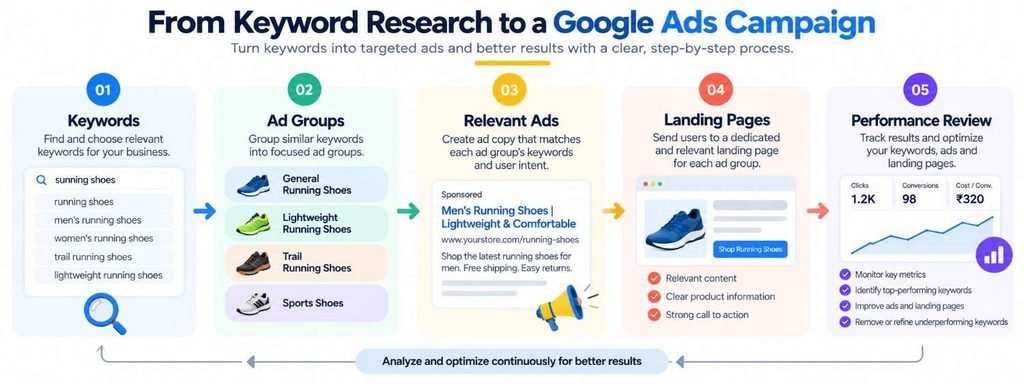
Start with seed keywords or a relevant website in Keyword Planner. Set your location and language, review suggestions and metrics, remove irrelevant terms, and organize the remaining keywords into closely related ad groups.
Is Google Keyword Planner a free keyword research tool?
Yes, there is no separate subscription fee for Keyword Planner. You must complete the required Google Ads account setup to access basic features, and running ads can incur advertising costs.
Is Google Ads keyword research the same as SEO keyword research?
No. Google Ads research focuses on paid advertising opportunities, including advertiser competition and bid estimates. SEO research focuses on organic search visibility and may use metrics such as organic ranking difficulty and competitor analysis. Some methods overlap, but the goals differ.
Can Keyword Planner guarantee clicks or conversions?
No. Its forecasts estimate potential performance based on available data and campaign settings. Actual results depend on your budget, bids, ad quality, targeting, competition, and customer behavior.
Final Thoughts
Google AdWords for keyword research now means using Google Ads and its built-in Keyword Planner to discover, evaluate, and organize keywords for paid search campaigns.
Start with relevant seed terms, choose the right audience settings, review keyword metrics carefully, and prioritize searches that align with your offer and budget. Organize related keywords into clear groups, then use campaign performance data to refine your choices.
For more practical digital marketing guidance, explore Wolfiedigi’s resources on search optimization, content strategy, and digital advertising.